
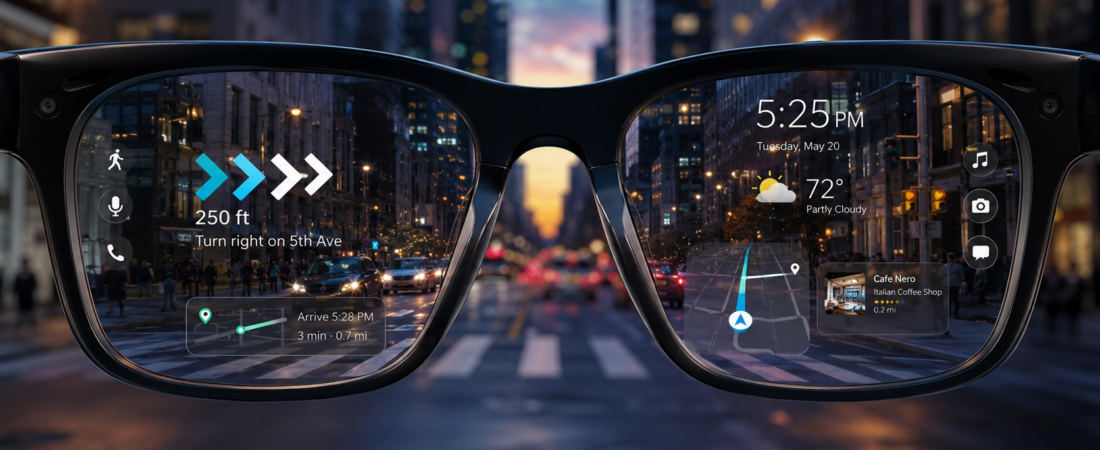
You are about to spend somewhere between $300 and $600 on a face-worn screen, and the marketing is not going to tell you whether that money is well spent for someone like you. This guide will. By the end you will know if the best AR glasses 2026 has to offer are genuinely worth it for how you work, travel, and watch things, or if waiting one more generation is the smarter call.
The quick answer
The best AR glasses 2026 finally look like normal sunglasses, and they are genuinely worth it for one group: people who want a big, private screen on the move (flights, hotel rooms, cramped desks) and already own a compatible phone, laptop, or handheld. One line why: they are excellent portable displays, not the all-day face computer the ads hint at. Most everyone else can still wait. Jump to who should buy now or who should wait, and see the full cost math further down.
Some links in this article are affiliate links. If you buy through them, we may earn a small commission at no extra cost to you. Learn more.
Table of contents
- What AR glasses actually are (and how they differ from smart glasses)
- The best AR glasses 2026 spec comparison
- Who should buy AR glasses now
- Who should wait
- The real cost of AR glasses (the part the ads skip)
- Key takeaways
- Frequently asked questions
What AR glasses actually are
Here is the single most useful thing to understand before you buy. Today’s AR glasses are a wearable display. You plug them into a phone, laptop, gaming handheld, or console over USB-C, and they beam that device’s screen onto a big floating window in front of your eyes. The glasses do not run apps on their own. They do not think. They borrow the brains of whatever you tether them to.
That matters because the word “AR” makes people picture a standalone spatial computer, like an Apple Vision Pro or a Meta Quest, painting interactive holograms over your kitchen. These are not that. The current crop from Xreal, Viture, and RayNeo are closer to a personal cinema screen you wear, with light 3DoF head tracking so the window can stay anchored in space while you look around.

It also helps to separate two categories that get lumped together. AR display glasses (Xreal One, Viture Beast) give you a large virtual screen but need a tether. AI smart glasses like the Meta Ray-Ban display line are lighter, last longer, and answer questions or show tiny notifications, but they cannot hand you a 150-inch movie. Different tools, different jobs. If you mainly want a discreet assistant on your face, you want the second category, not these.
The best AR glasses 2026 spec comparison
Four models cover almost everyone worth considering right now. The Xreal One Pro is the well-rounded pick, the Viture Beast wins on brightness and movies, the Xreal One is the value entry point, and the RayNeo Air line goes big and cheap. Prices below are current sticker prices, and virtual screen sizes are the manufacturer’s claimed equivalent, viewed at a virtual distance of about four meters, not a physical panel.
| Model | Price | Field of view | Brightness | Virtual screen (claimed) | Best for | Link |
|---|---|---|---|---|---|---|
| Xreal One Pro | $599 | 57 degrees | 700 nits | 171 inches | Productivity, best all-round | check current price |
| Viture Beast | $549 | 58 degrees | 1250 nits | 174 inches | Movies, gaming, bright rooms | check current price |
| Xreal One | $499 | 50 degrees | Not listed | 147 inches | First pair, value | check current price |
| RayNeo Air 3s Pro | See current price | Not listed | 1200 nits | 201 inches | Big, cheap cinema | check current price |
Notice something. The Xreal One Pro, the priciest here, is also the dimmest at 700 nits, while the Viture Beast and RayNeo push past 1200 nits. Brightness is not the whole story (Xreal’s optics and color are excellent), but it is a good example of why a spec sheet alone will mislead you. For the full official rundown, Xreal’s official One Pro page lists the fine print.
Who should buy AR glasses now
AR glasses are a genuinely great buy in 2026 if you fit one of these profiles.
The frequent flyer or commuter. This is the strongest case. You want a huge, private screen in a seat where a laptop barely opens, and you do not want the person beside you reading along. A pair of Xreal One Pro or Viture Beast plugged into your phone turns a tray table into a personal theater. Reviewers and frequent travelers consistently rank this as the killer use case, and it tracks with what most flyers report once they try it.

The small-space desk worker. If you work from a laptop in a tight apartment or a rotating hot desk, glasses can float two or three virtual windows in front of you without a second physical monitor. They are not as sharp or as effortless as real screens, but they pack into a case. If a real display is an option, though, a good portable monitor is still easier on your eyes for a full workday.
The handheld gamer. Steam Deck, ROG Ally, and Switch owners get a big screen without the bulk. Latency is low, the picture is close, and it travels.
If you are in one of those groups and already own a compatible recent phone, laptop, or handheld, this is a real yes. Our top pick for most of those people is the Xreal One Pro for its balance of sharpness, comfort, and screen control.
Who should wait
Now the honest gate. Wait if you see yourself here.
You expected an all-day face computer. If the dream is walking around town with holograms floating over the real world, hands free, replacing your phone, that product does not exist yet at this price. These glasses shine when you are seated and plugged in, not strolling.
You do not have a compatible device. The glasses are only half the setup. If your phone is older or your console does not output video over USB-C, you are looking at adapters or a separate compute puck, and the value drops fast.
You need prescription vision correction and hate fuss. You can add inserts, but that is extra money and an extra step (more on cost below).
You mostly want an assistant, not a screen. If you picture asking your glasses for directions or translating a menu, that is the smart glasses lane, not this one. Buying AR display glasses for that job leads to buyer’s remorse.
Waiting is not a knock on the tech. It is a knock on the fit. The design finally grew up this year, and every generation gets lighter and brighter, so there is no penalty for holding out until the use case is clearly yours.
The real cost of AR glasses (the part the ads skip)
The sticker price is the start of the math, not the end. Budget honestly.
- The glasses: roughly $499 to $599 for a good pair (Xreal One, Viture Beast, Xreal One Pro).
- A device to feed them: they display whatever you plug in, so you need a fairly recent phone, laptop, handheld, or console. If you have one, great. If not, that is the real expense.
- Prescription inserts: about $50 to $100 extra if you wear glasses. Viture’s prescription frame runs around $79, and third-party inserts land near $104.
- An iPhone adapter: some iPhones need a small USB-C video adapter, an easy thing to forget at checkout.
- Power: the glasses draw from the device they are tethered to, so a long flight can drain your phone quickly. A travel power bank that can actually keep up is a smart companion buy, and how you pick one matters more than people think.
One more reality check on the headline spec. The “171-inch screen” sounds enormous, but the actual field of view is only 50 to 58 degrees. Your eyes see a large, bright window floating ahead, not a wall-to-wall wraparound. It is impressive and immersive. It is not the infinite canvas the phrase implies.
Key takeaways
- AR glasses in 2026 are wearable displays that tether to a phone, laptop, or console, not standalone spatial computers.
- They are worth it now for frequent flyers, tight-space desk workers, and handheld gamers with a compatible device.
- Wait if you want an all-day face computer, lack a compatible device, or really want an AI assistant (that is smart glasses).
- Real field of view is 50 to 58 degrees, far smaller than the “171-inch” marketing suggests.
- Budget beyond the $499 to $599 sticker for prescription inserts, possible adapters, and a power bank.
- Best all-round pick for most buyers: Xreal One Pro. Best for movies and bright rooms: Viture Beast. Best value entry: Xreal One.
Frequently asked questions
Are AR glasses worth it in 2026?
Yes, for the right person. If you want a big private screen on the go and own a compatible phone, laptop, or handheld, they are a genuine upgrade. If you want a hands-free AI assistant or an all-day heads-up computer, wait.
Do AR glasses replace my monitor or TV?
For travel and tight spaces, they can stand in convincingly. As a permanent desk setup, a real monitor is still sharper and more comfortable for long sessions. Treat them as a portable second screen, not a full monitor swap.
Do I need a specific phone to use AR glasses?
You need a device that outputs video over USB-C, such as a recent iPhone or Android flagship, a MacBook, a Windows laptop, or a handheld like the Steam Deck. Some iPhones require a small adapter. Check compatibility before buying.
What is the difference between AR glasses and smart glasses?
AR display glasses (Xreal, Viture) give you a large tethered virtual screen. Smart glasses (Meta Ray-Ban style) are lighter, standalone, and focus on audio, cameras, and AI answers, but cannot show a big display.
Can I wear AR glasses if I need prescription lenses?
Yes. Most brands sell snap-in prescription inserts for roughly $50 to $100. Budget for that on top of the glasses.
Which AR glasses are the best pick right now?
For most people, the Xreal One Pro strikes the best balance of image quality, comfort, and screen control. Movie and gaming fans who want maximum brightness should look at the Viture Beast, and the Xreal One is the value starting point.
The verdict
The best AR glasses 2026 delivers are a real product now, not a promise. The design finally looks normal, the screens are bright and immersive, and for flyers, cramped-desk workers, and handheld gamers they earn their price. Just buy them for what they are: an excellent portable display that leans on the device already in your bag. If you were hoping for a standalone AR computer for your face, that generation is still coming, and there is zero shame in waiting for it.
If you are ready, the Xreal One Pro is the pick most people will be happiest with, with the Viture Beast close behind for entertainment and the Xreal One as the friendly on-ramp.
As an Amazon Associate I earn from qualifying purchases.